NF / Atlassian

Approval Desk – Bulk Approvals for JSM
Bulk approve JSM requests from the customer portal — with the context approvers need.
Approval Desk gives Jira Service Management approvers one focused inbox for native pending approvals. Review the requester, request type and configured context before deciding, then approve or decline individually or in a clearly confirmed batch. The app keeps Jira's approval workflow and permissions in charge.
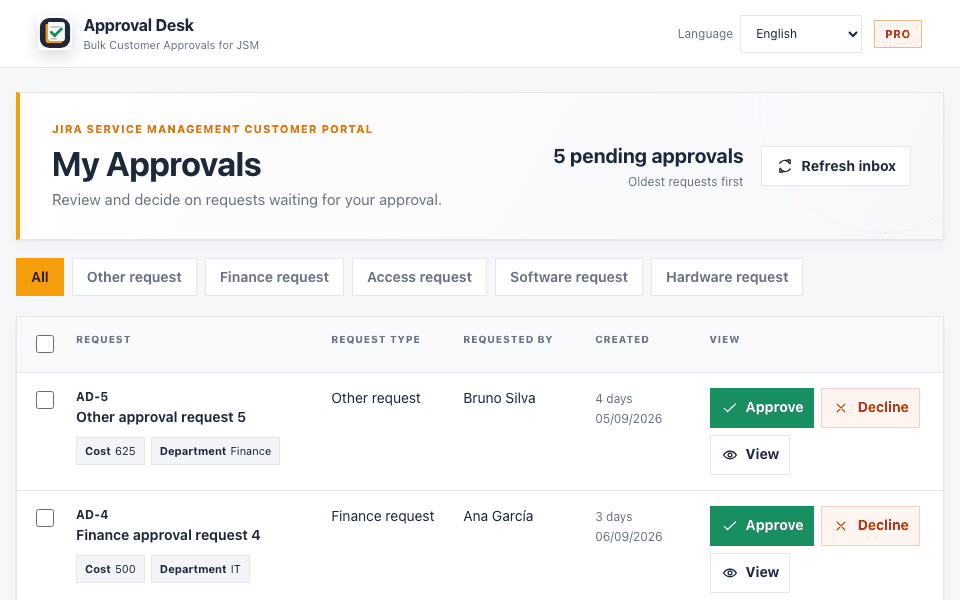
Approval inbox with context and bulk actions — real interface capture
- Pending approvals in one focused inbox
- Configured context visible before opening a request
- Explicit selection and confirmation for bulk decisions
NF / Problem
What problem does this solve?
Approvers need a decision queue, not another full Jira workspace.
Native JSM approvals can be spread across customer-portal requests and full Jira views. Approval Desk narrows the work to approvals assigned to the signed-in user, keeps relevant fields visible and makes the consequence of a bulk decision explicit.
NF / How it works
4 steps, no platform.
- 01See what is waitingLoad native JSM approvals assigned to the signed-in approver.
- 02Review the contextSee request type, requester and administrator-configured fields without opening every request.
- 03Decide safelyApprove or decline one request with a clear action and native JSM result.
- 04Process a batchSelect compatible requests, confirm the exact count and see success, already-completed and failed results separately.
NF / Features
What it does.
Only shipped behaviour is marked active. Beta and planned items are labelled honestly.
- active
Native approval inbox
One view for approvals the signed-in JSM user can answer.
- active
Decision context
Show the request fields an administrator selects for each request type.
- active
Individual approve or decline
Keep one-request decisions direct and tied to the native JSM approval action.
- active
Confirmed bulk decisions
Select multiple requests and confirm the exact action and count before execution.
- active
Partial-result reporting
Separate successful decisions, approvals already completed elsewhere and technical failures.
- active
Safe Bulk policy
Pro administrators can require individual review when a configured rule does not pass or cannot be evaluated.
- active
Admin-controlled scope
Choose service projects, request types and visible context columns per tenant.
- active
Free and Pro plans
Try the core inbox on Free and expand project, context and bulk limits with Pro.
Built for
- JSM approvers
- Service desk leads
- IT, HR and procurement teams
- Teams with recurring approvals
Pricing
- Free1 service project, 3 context columns, up to 5 per bulk operation and 10 bulk decisions/month.Free
- ProUnlimited projects, 8 context columns, up to 50 per operation and Safe Bulk policy controls.Marketplace
Individual approvals remain available on Free. Billing and entitlement are managed by Atlassian Marketplace.
Billing handled securely by Atlassian Marketplace.
NF / Related
More Atlassian tools
NF / Product 01

ReadyGate
Validate Jira workflows before work moves forward.
NF / Product 02

License Radar for Jira
A read-only Jira license review built on observable activity evidence and transparent cost estimates.
NF / Product 03

Config Watch
Track relevant Jira configuration changes.
NF / FAQ
Questions, answered plainly.
Does Approval Desk replace native JSM approvals?
No. It presents pending native Jira Service Management approvals in a focused inbox and sends the decision through the signed-in user's existing JSM approval permission.
Approval Desk – Bulk Approvals for JSMWhat can an approver see before deciding?
The request title, type, requester, age and the fields the administrator configured for that request type — for example cost, department, supplier or reason — subject to what the signed-in user is authorised to see in JSM.
Approval Desk – Bulk Approvals for JSMWhat happens when a bulk operation is only partly successful?
Approval Desk keeps the result split into successful decisions, approvals already completed elsewhere and technical failures. The remaining items stay actionable for individual review or retry.
Approval Desk – Bulk Approvals for JSMCan an administrator control where the inbox looks?
Yes. Administrators choose service projects, request types and the context columns shown to approvers. Pro also includes Safe Bulk rules that fail closed when a rule blocks or cannot be evaluated.
Approval Desk – Bulk Approvals for JSMDoes it change Jira permissions or request data?
No. It does not change JSM permissions, workflows or request content. Approvals are answered through the native JSM API, and the app stores only tenant configuration and minimal bulk-operation metadata.
Approval Desk – Bulk Approvals for JSMWhat is included in Free and Pro?
Free includes the inbox, one service project, three context columns, individual approvals and up to five items per bulk operation within the monthly limit. Pro adds broader configuration, eight columns, up to 50 items per operation and Safe Bulk controls. See the live Marketplace listing for current limits and prices.
Approval Desk – Bulk Approvals for JSMNF / Support
Need help with Approval Desk – Bulk Approvals for JSM?
Docs, troubleshooting and a direct line to the people who build it.